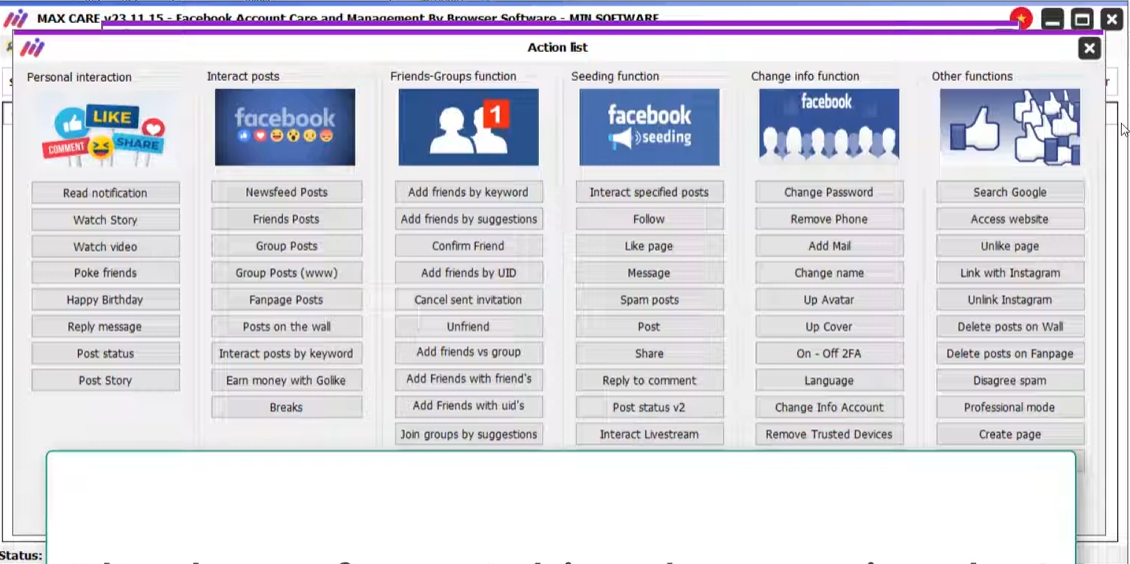
MaxCare Facebook: Your Ultimate Tool for Multi-Account Management
If you work in social media marketing, affiliate marketing, or manage multiple Facebook accounts daily, you've likely heard of MaxCare Facebook. This powerful platform is among the most sought-after Facebook automation tools, tailored for marketers, agencies, and online businesses aiming to efficiently handle numerous Facebook accounts.
As part of the MINSoftware ecosystem, MaxCare Facebook focuses heavily on:
- Multi-account management
- Facebook automation
- Account warm-up activities
- Human-like behavior simulation
- Proxy integration
- Anti-detect browser support
- Marketing automation workflows
- Time-saving social media operations
What is MaxCare Facebook?
MaxCare Facebook is a robust desktop automation software that lets users manage and automate multiple Facebook accounts from a single, centralized dashboard. This software is designed to reduce manual tasks, enhance workflow efficiency, and allow users to securely scale their Facebook activities.
Common applications of MaxCare include:
- Facebook marketing
- Community management
- Audience engagement
- Marketplace activity
- Lead generation
- Facebook group management
- Affiliate marketing
- E-commerce promotion
- Brand visibility campaigns
Main Features of MaxCare Facebook
1. Multi Facebook Account Management
MaxCare empowers users to manage hundreds of Facebook accounts from one dashboard, offering features such as:
- Bulk account imports
- Account organization into groups
- Cookie and session management
- Secure storage of account information
- Individual proxy assignment
- Easy account status monitoring
This functionality is particularly beneficial for agencies and marketers juggling multiple client accounts.
2. Facebook Automation Tools
The primary draw of MaxCare is its extensive automation capabilities. Users can automate several Facebook activities including:
- Liking posts
- Commenting
- Sharing content
- Joining groups
- Sending friend requests
- Messaging
- Browsing feeds
- Watching videos
- Interacting with pages
- Posting content
The automation settings can be finely tuned to mimic natural, human-like interactions.
3. Human Behavior Simulation
MaxCare incorporates behavior simulation features to mitigate repetitive patterns, which can raise red flags. These features include:
- Action randomization
- Delay introduction between activities
- Scrolling behavior simulation
- Mouse movement simulation
- Randomized interaction timing
- Diverse actions across accounts
This helps craft more organic-looking account activity.
4. Proxy Integration Support
Proxy support is crucial for effective multi-account management. MaxCare supports:
- HTTP proxies
- HTTPS proxies
- SOCKS5 proxies
- Mobile proxies
- Rotating proxies
This allows users to assign unique proxies to individual accounts for better isolation.
5. Browser & Anti-Detect Integration
MaxCare integrates seamlessly with anti-detect browsers and profile management systems, which enables users to:
- Separate browser fingerprints
- Utilize different browser environments
- Improve account isolation
- Manage extensive account operations more effectively
This combination is beneficial for advanced marketing workflows.
6. Facebook Group Automation
Handling Facebook groups manually can be time-consuming. MaxCare offers tools for:
- Joining groups
- Posting in groups
- Commenting on group posts
- Interacting with group members
- Managing group activities
These features are instrumental for community growth and engagement.
7. Facebook Marketplace Support
Many users apply MaxCare for their Facebook Marketplace workflows, automating repetitive tasks such as:
- Marketplace browsing
- Product posting
- Message management
- Listing oversight
8. Scheduling & Task Management
MaxCare also includes features that allow users to automate their tasks throughout the day. You can:
- Schedule actions
- Queue activities
- Run automated campaigns
- Simultaneously manage multiple workflows
This is particularly advantageous for users operating across various time zones.
9. Account Warm-Up Activities
Newly created Facebook accounts typically benefit from gradual activity before they can handle heavy usage. MaxCare provides warm-up activities such as:
- Feed browsing
- Video watching
- Random interactions
- Light engagement
- Natural browsing patterns
This approach helps maintain a more active appearance for your accounts.
10. Bulk Operations
The platform supports bulk operations, aiding faster workflow management. Users can:
- Import large account lists
- Conduct actions across multiple accounts simultaneously
- Edit account settings in bulk
- Quickly manage proxy lists
This feature saves a significant amount of time for large-scale operations.
Who Uses MaxCare Facebook?
MaxCare Facebook is used by various professionals, including:
- Social media marketers
- Growth marketers
- Lead generation specialists
- Affiliate marketers
- Social media agencies
- E-commerce sellers
- Community managers
- Online businesses
- Digital marketers
Advantages of MaxCare Facebook
Some of the major advantages include:
- Effortless multi-account management
- Robust automation features
- Proxy support for enhanced security
- Human-like activity simulation
- Bulk workflow management capabilities
- Significant time savings
- Flexible configuration settings
- Effective handling of large-scale accounts
Things to Know Before Using MaxCare
As with any automation software, it's crucial to approach usage with caution. Key considerations include:
- Avoid excessive automation
- Choose high-quality proxies
- Properly warm your accounts
- Steer clear of aggressive activity spikes
- Employ realistic behavior settings
- Correctly separate accounts
Good account management practices are essential for success.
Is MaxCare Facebook Worth It?
For marketers and agencies managing numerous Facebook accounts, MaxCare Facebook can drastically minimize manual effort while enhancing workflow efficiency. The software amalgamates automation, account management, proxy support, and behavioral simulation into a single, intuitive platform.
If you're in the market for an effective Facebook automation and multi-account management solution, MaxCare remains one of the standout tools within the automation landscape.
Final Thoughts
Marketing on Facebook at scale necessitates proper organization, automation, and workflow management. MaxCare Facebook equips marketers with an expansive suite of tools to manage multiple accounts more efficiently while automating repetitive tasks.
Whether you're orchestrating marketing campaigns, nurturing communities, managing client pages, or overseeing large account operations, MaxCare can streamline your daily activities.
If you're ready to experience MaxCare Facebook for yourself, register here.
Looking to Buy or Sell Accounts?
Browse verified listings from trusted sellers on Accify